








“Database migrations are no longer on our list of worries” - See how Modem.dev uses branching
/Changelog

Changelog

The latest product updates from Neon

RSS feed

New NAT gateway IP addresses

We've added new NAT gateway IP addresses in the AWS US East (N. Virginia), US East (Ohio), and US West (Oregon) regions to expand infrastructure capacity. If you have IP allowlists on external systems that Neon connects to, update those allowlists to include the new addresses. Connections may be affected intermittently if traffic routes through non-allowlisted NAT gateways.

See our Regions documentation for the complete list of NAT gateway IPs for all regions.

New VPC endpoint services for Private Networking

We've added new VPC endpoint service addresses for Private Networking in the AWS US East (N. Virginia), US East (Ohio), and US West (Oregon) regions. If you've set up Private Networking in these regions, you can now use the additional endpoint service addresses for enhanced infrastructure capacity and reliability.

For the complete list of VPC endpoint service addresses by region, see our Private Networking guide.

Neon Auth SDK simplified

We've released a major update to the server-side Neon Auth SDK (@neondatabase/auth/next/server) for Next.js applications.

Unified entry point

The SDK now uses a single createNeonAuth() function that replaces the previous separate functions (neonAuth(), authApiHandler(), neonAuthMiddleware(), createAuthServer()). Configure authentication once and access all functionality from a single object:

// lib/auth/server.ts
import { createNeonAuth } from '@neondatabase/auth/next/server';

export const auth = createNeonAuth({
  baseUrl: process.env.NEON_AUTH_BASE_URL!,
  cookies: { secret: process.env.NEON_AUTH_COOKIE_SECRET! },
});

// Use everywhere in your app
export const { GET, POST } = auth.handler();           // API routes
export default auth.middleware({ loginUrl: '...' });   // Middleware
const { data: session } = await auth.getSession();     // Server components
await auth.signIn.email({ email, password });          // Server actions

Explicit configuration

Configuration is now explicit rather than implicit. You must pass baseUrl and cookies.secret directly to createNeonAuth() instead of relying on automatic environment variable reading, making dependencies clear and eliminating "magic" behavior.

Session caching

Session data is now automatically cached in a signed cookie, reducing API calls to the Auth Server by 95-99%. Sessions are cached for 5 minutes by default (configurable) and automatically refresh as needed.

Breaking changes

This release includes breaking changes. If you're using Neon Auth and want to upgrade to the latest SDK version, you will need to update your application code. Key changes include replacing separate auth functions with the unified createNeonAuth() API, adding a required NEON_AUTH_COOKIE_SECRET environment variable, and adding dynamic = 'force-dynamic' to server components that use auth methods.

For detailed migration instructions, see the migration guide. For complete API documentation, see the Next.js Server SDK reference.

Getting started

To see the latest SDK in action, check out the demo applications, including a Next.js demo with server components, a React + Vite demo with external UI, and a React demo with the full neon-js SDK. The repository also includes AI coding assistant skills for Cursor and Claude Code with updated setup guides and code examples. See the Neon Auth quickstart guide and Server SDK reference to get started.

Neon Auth is a managed authentication service that branches with your database. See the Neon Auth overview to learn more.

Instagres adds REST API

Instagres now offers a REST API for programmatic database provisioning, making it easy to integrate Postgres into your platform, CI/CD pipelines, testing frameworks, and automation workflows.

The new API enables you to create databases with a single HTTP request:

curl -X POST https://instagres.com/api/v1/database \
  -H 'Content-Type: application/json' \
  -d '{"ref": "your-app-name"}'

The API returns a connection string, claim URL, and expiration timestamp. You can also retrieve database details using GET /api/v1/database/:id.

Instagres provides instant cloud-hosted Postgres that spins up in seconds. No signup or registration required. See the Instagres documentation for more information.

Data anonymization
  • You can now anonymize columns that are part of primary keys when creating anonymized branches. Neon automatically handles foreign key constraints during the anonymization process, ensuring referential integrity is maintained across related tables.
Neon CLI
  • The neon init command now requires authentication before running. If you're not already authenticated, the CLI will automatically open your browser to log in. Additionally, neon init now installs Cursor skills from the Neon skills repository instead of rules, providing more flexible and powerful AI agent capabilities for database development workflows.

To access these new features, upgrade to the latest version of the Neon CLI (version 2.20.2). For upgrade instructions, see Neon CLI upgrade.

Neon MCP Server
  • The provision_neon_auth tool in the Neon MCP Server is now idempotent and returns your Neon Auth configuration details (base URL and JWKS URL) even when Neon Auth is already provisioned. This makes it easier to retrieve your authentication configuration without needing to make separate API calls.
Neon Skills
  • You can now install Neon agent skills as a Claude Code plugin, which bundles both the skills and the Neon MCP Server for natural language database management. See Neon Agent Skills.

    /plugin marketplace add neondatabase/agent-skills
    /plugin install using-neon@neon-agent-skills

    Agent Skills are resources that AI agents can discover and reference to help you work more accurately and efficiently with Neon.

Neon VS Code Extension
  • The Neon VS Code Extension now automatically focuses on the Databases view after connecting to a branch, making it easier to immediately see your database schema and objects. The extension also includes performance improvements with smart caching and background data refresh for faster load times. Upgrade to the latest version to access these improvements.
OpenTelemetry integration
  • The OpenTelemetry monitoring integration now supports gRPC protocol endpoints in addition to HTTP/HTTPS. When configuring an OpenTelemetry integration, you can use gRPC OTLP endpoints, and Neon will validate your credentials before saving the configuration.
SQL Editor
  • Added a copy button to the SQL Editor that lets you copy query results as JSON directly to your clipboard without downloading a file. The copy button appears alongside the download button in the query results view.
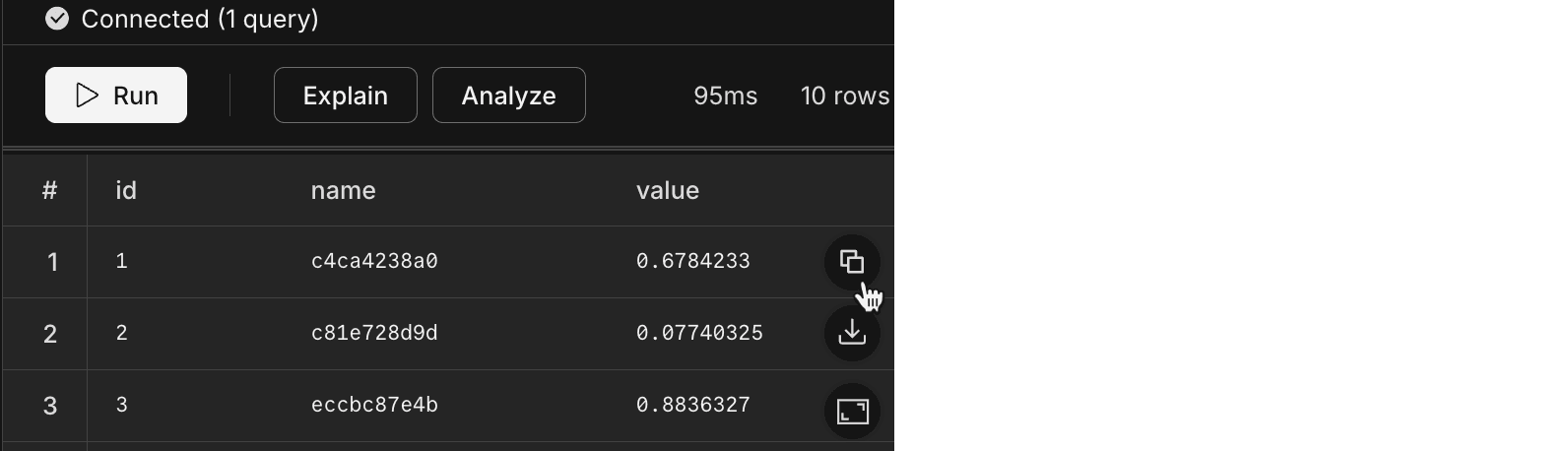
    copy json SQL Editor

Fixes
  • Fixed an issue in the Neon consumption history API endpoint that caused errors when retrieving project consumption data.

  • Fixed an issue where deleting a Postgres role would fail if the role had been granted specific privileges (such as SELECT or INSERT) by another role. Role deletion now properly revokes all individual privileges before removing the role, ensuring successful deletion in all scenarios.
Give your AI assistant Neon expertise

Install our Agent Skills to teach your AI coding assistant about Neon best practices, connection methods, ORM setup, and branching workflows. Works across Claude Code, Cursor, VS Code, and other AI tools.

npx skills add neondatabase/agent-skills

Agent Skills work alongside the Neon MCP Server. The skill provides reasoning and guidance while the MCP server provides capabilities like creating branches and running queries. Learn more in our blog post on Agent Skills.

MCP Server provisions Data API

The Neon MCP Server now supports provisioning the Neon Data API for your databases with optional JWT authentication. Ask your AI assistant:

Can you provision Data API access for my database with Neon Auth authentication?

The provision_neon_data_api tool enables HTTP-based access to your Neon databases and supports multiple authentication options: unauthenticated access, Neon Auth, or external providers (Clerk, Auth0, Stytch, and others). This makes it easier to set up Data API access directly from your AI assistant without switching to the Neon Console.

To get started with the Neon MCP Server, run npx neonctl@latest init to install and configure it automatically. Learn more in Neon MCP Server.

Postgres protocol 3.2 support

Neon now supports Postgres 18's protocol 3.2 with enhanced cancellation keys. This protocol support applies retroactively to all Postgres versions (14, 15, 16, 17, and 18). Clients that support the new protocol will automatically benefit from these improvements without any configuration changes needed.

Get started with Neon faster

We've added quick actions to the Neon docs. Everything you need to go from docs to working code is now just a click away.

Quick actions available on every doc page:

  • Copy page as markdown
  • Open in ChatGPT or Claude
  • Copy neon init command for MCP Server setup
  • Connect MCP on Cursor or VS Code

Find the prompts on the documentation homepage or try them here:

Consumption API
  • We increased the burst limit for our Consumption API endpoints. The higher limit allows for temporary spikes in request volume, making it easier to handle periods of high activity without hitting rate limits.

    The Consumption API lets Neon Scale and Enterprise plan users track resource usage (compute time, storage, data transfer) across projects programmatically.

Import Data Assistant
  • Fixed an issue where the Import Data Assistant would get stuck after creating a new project, preventing users from completing their database import.

    The Import Data Assistant, available from the Neon Console, helps you move an existing Postgres database to Neon using just a connection string.

Neon VS Code Extension
  • Added support for configuring the Neon MCP Server in read-only mode. You can now restrict the MCP Server to read-only tools and read-only SQL transactions directly from the VS Code extension settings. See Neon VS Code Extension.

Neon Auth on Vercel previews

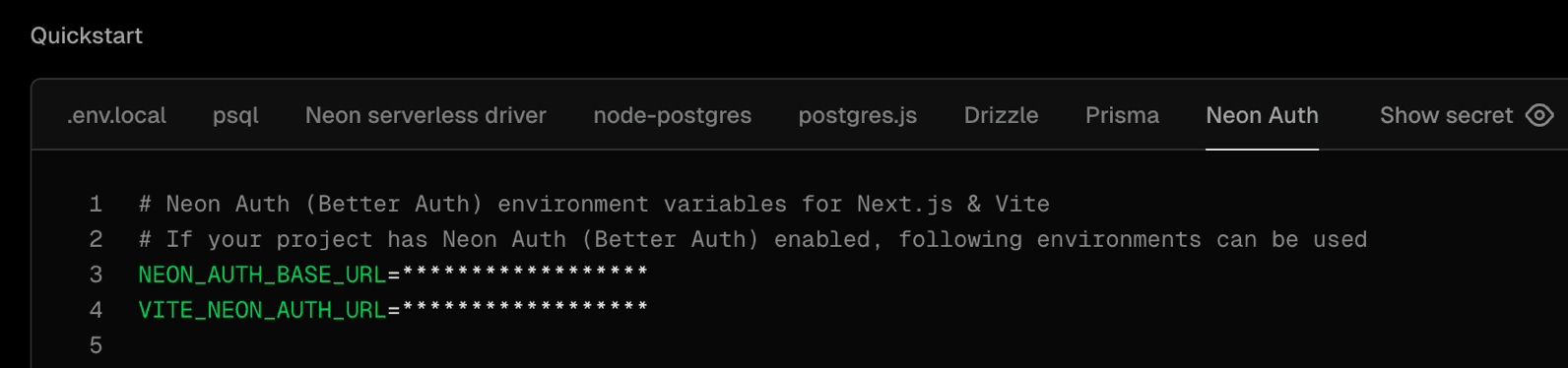
Both the Vercel-managed and Neon-managed integrations now automatically provision Neon Auth on preview branches when enabled on your production branch. Preview deployments get the NEON_AUTH_BASE_URL and VITE_NEON_AUTH_URL environment variables configured automatically.

Neon Auth Vercel variables

Neon Auth provides managed authentication that stores user profiles in your database. When your database branches, auth data branches with it, making it easy to test authentication in isolated preview environments. Learn more.

To see this in action, check out this new end-to-end guide: Testing Auth Changes Safely with Vercel and Neon Branching.

One command for Neon MCP Server and VS Code Extension

The neon init command now configures both the Neon MCP Server and the Neon VS Code Extension in a single step:

npx neonctl@latest init

This command authenticates via OAuth, creates a Neon API key, and sets up:

  • Neon MCP Server — Lets AI assistants manage your Neon projects, branches, and databases through natural language commands
  • Neon VS Code Extension — Brings database schema browsing, SQL editing, and table data management directly into your IDE

Previously introduced as separate features (MCP Server setup in December and VS Code Extension in January), you can now get your complete AI-powered database development environment configured with one command in Cursor or VS Code.

For more information, see Connect MCP clients to Neon and Get started with the Neon VS Code Extension.

New Neon logo

You might notice a new Neon logo across the site, dashboard, and docs. Same Neon. New mark.

New Neon logo

The logo is refreshed while staying true to the elephant and N we founded the company with. This update brings Neon's visual identity into the Databricks universe as we continue growing together, helping more than a million developers ship faster with Postgres.

If you reference Neon in your product, docs, or integrations, download the official assets at neon.com/brand. The page includes logo files, usage guidelines, and brand-safe variants for light and dark backgrounds.

For more on the design thinking behind the new logo, see the blog post.

Data anonymization
  • Data anonymization now supports custom masking rules defined via SQL or the Neon API. Custom masking rules appear as text in the data anonymization UI and are preserved when running anonymization, allowing you to safely mix Console, API, and SQL workflows.
  • Foreign key columns can no longer be masked directly to maintain referential consistency. Instead of showing masking rule suggestions, the data anonymization UI now displays an alert with an action to navigate to the corresponding primary key column. Clicking "Go to primary key" scrolls to and highlights the relevant primary key where you can set masking rules.
Data API
  • Fixed an issue where project-scoped API keys could not read Data API status on organization-owned projects. The endpoint now uses project-level permissions instead of requiring organization-level access.
Monitoring integrations
  • Error messages returned by Neon's monitoring integrations now display on integration cards on the Integrations page in your Neon project, making it easier to identify and troubleshoot integration issues.
Neon Auth
  • Added a toggle in the Create Project dialog in the Neon Console that lets you enable Neon Auth when creating new projects.
  • OAuth provider credentials (client ID and client secret) are now hidden from organization members and collaborators. Only admin users can view these credentials in the Console.
Neon MCP Server
  • Fixed read-only mode detection in OAuth flows for the Neon MCP Server. Read-only mode now properly restricts access based on OAuth scopes.
  • Added scope selection UI to the OAuth authorization flow, letting users optionally deselect write permissions when authorizing MCP clients.
  • Fixed account resolution when using project-scoped API keys. Previously, project-scoped API keys would cause errors when attempting to access account-level endpoints since these keys are restricted to project-level operations.
  • Fixed OAuth token verification regression that was causing authentication failures for users who authenticated via OAuth. The server now correctly checks OAuth tokens before falling back to API key verification.
Was this page helpful?

Subscribe to our changelog.
No spam, guaranteed.